⚓ Berth Management –
Full Control Over Your Harbour
Berths, reservations, crane appointments and winter storage – all in one system, perfectly tailored to daily harbour operations.
Real-time occupancy at a glance
The colour-coded berth overview shows at a glance which spaces are free, occupied, reserved or under maintenance – synchronised in real time for all staff simultaneously. No more double bookings or information gaps.
Dock and berth types
Floating pontoon, fixed jetty, pontoon, quay wall – each dock type is individually configurable. Berths are numbered, named and assigned to a dock.
Technical data per berth
Length, width, draught, power connection, water connection – all relevant technical data is maintained and available as filters during searches.
Flexible price structure
Night, week, month and year prices per berth individually configurable. Seasonal prices, loyalty discounts and minimum stays are also settable.
Automatic status synchronisation
When a guest books, pays or cancels via the customer app, the berth status is immediately updated in the backend – without manual intervention from the harbour master.
Harbour A – Occupancy
Live
Interactive Harbour Map
Instead of long lists, see your harbour as a graphical map: every berth is colour-coded by status – free, occupied, reserved or under maintenance. Staff and guests grasp occupancy at a glance and book free berths directly with a click.
Harbour at a glance
All docks and berths shown graphically – occupancy is instantly clear, with no tables needed.
Click & book
Free berths are clicked and booked right on the map – fast and intuitive for team and guest.
Colour-coded status
Free, occupied, reserved and under maintenance are clearly distinguished by colour – no more double bookings.
Also in the customer app
Guests see the same interactive map in the app and choose their preferred berth themselves – around the clock.
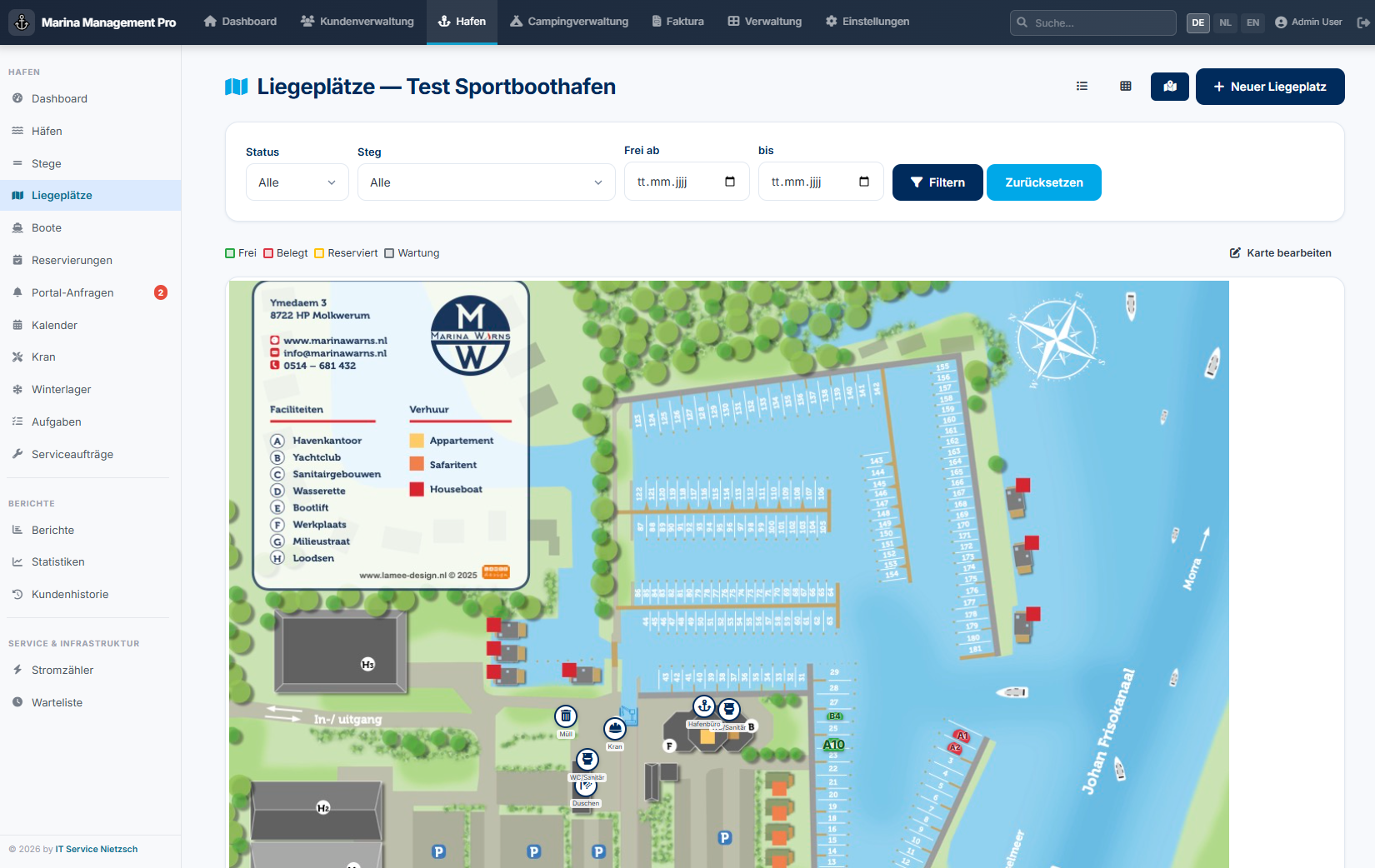
Interactive harbour map
Waitlist & Online Requests
No prospect is lost: requests for fully booked berths are structured on the waitlist, and all online requests from your guests come together in one central place.
Waitlist
Prospects for occupied berths are recorded and notified specifically when availability arises – free berths are reassigned immediately.
Central online requests
All requests from the customer app (berth, crane, winter storage) collect in one place and are confirmed with a single click.
Fast response
React without delay – this strengthens customer loyalty and ensures higher occupancy.
Interactive occupancy plan
FullCalendar-based calendar for daily, weekly and monthly occupancy overview.

Drag & Drop
Move and extend reservations to other berths or time periods by drag & drop – the status is immediately saved and visible to all users. No data maintenance in multiple systems required.
iCal export & integration
Export the entire occupancy calendar as an iCal file and integrate seamlessly with Google Calendar, Apple Calendar, Outlook or any external booking system.
Multilingual calendar
FullCalendar is automatically displayed in the configured system language – in one of 11 languages (German, English, Dutch, French, Spanish, Polish, Danish, Norwegian, Swedish, Italian or Hungarian). Month names, weekdays and buttons are fully translated.
Complete season management
From crane appointment planning to winter storage – all in one system.
🏗 Crane Management
- Launching (season start)
- Haul-out (season end)
- Step mast
- Unstep mast
- Appointment list with print function
- Record boat dimensions & weight
❄️ Winter Storage
- Space management
- Winter storage bookings
- Occupancy overview
- Automatic invoicing
- Storage in and out dates
- Space types (indoor / outdoor)
Manage your harbour digitally – starting today.
ITN Marina Management adapts to your harbour, not the other way around. Talk to us about your individual needs.